Best Social Media Management Tools for Nonprofits in 2026 (Free Discounts Included)
Nonprofits need affordable social media tools. Here are the best options with free plans and nonprofit discounts in 2026.

TL;DR
Nonprofits rarely have room in the budget for another software subscription, and social media tools are usually the first thing that gets cut when money’s tight. The good news is you genuinely don’t have to pay full price, or anything at all in some cases, to run a solid social media presence in 2026. Buffer offers a 50 percent nonprofit discount, Social by InstantDM has a free plan with AI features built in, Canva for Nonprofits gives verified organizations a free upgrade to Pro, Meta Business Suite costs nothing at all, and Hootsuite runs its own nonprofit pricing. Setting up a TechSoup account is worth doing early too, since it opens the door to discounts across several of these tools at once rather than applying separately everywhere.
Introduction
I’ve worked alongside a few different nonprofits on their social media over the past year, and the same conversation comes up almost every time. Someone on the team wants to post more consistently, wants better analytics to show the board, wants to actually coordinate with volunteers instead of everyone posting whenever they remember to. And then the conversation stalls the moment pricing comes up, because most social media tools are built and priced with businesses in mind, not organizations running on donations and grant funding.
So I put together everything I’ve learned about doing this well without blowing through a budget that barely exists in the first place. That covers what actually matters when you’re choosing a tool as a nonprofit specifically, which platforms are worth your limited time, how to actually get your message in front of people who care, and a full rundown of the tools that offer real discounts or genuinely useful free plans rather than a stripped down version designed to push you toward paying. None of this requires a dedicated social media hire. It just requires picking the right combination of tools once and building a routine around them.
What nonprofits should look for in a social media tool
Here’s the thing worth saying upfront. Nonprofits aren’t chasing the same goals as a business posting on social media. You’re not selling a product, you’re raising awareness, recruiting volunteers, and building a community around a cause. That difference changes what actually matters in a tool.
Affordability sits at the very top of the list, and there’s no getting around that. Most nonprofits are working with tight budgets, so you need something that’s either free or discounted enough to make sense against everything else competing for that money.
Support across multiple platforms matters too. You’re probably active on Facebook, Instagram, LinkedIn, and maybe TikTok, and juggling separate logins for each one eats up time nobody on a small team has to spare.
Scheduling is close to essential. Posting manually every single day just isn’t realistic once you factor in everything else a nonprofit team is already handling, so a tool that lets you plan ahead and queue things up in advance saves real hours.
Analytics matter for a different reason than they do for a business. You need something to actually show your board and your donors that the time going into social media is producing real results, not just anecdotal impressions.
And team collaboration rounds out the list, since it’s rarely just one person managing everything. Volunteers, staff, and sometimes board members might all touch the account at different points, so a tool built to support more than one user avoids a lot of friction.
The genuinely good news is that plenty of tools out there offer free plans or steep nonprofit discounts, so paying full retail price simply isn’t necessary if you know where to look.

Nonprofit social media strategy and management
Here’s what I’ve picked up about what actually works for nonprofits specifically, beyond just picking the right software.
Tell stories rather than statistics. People connect with a single story far more than they connect with a number. Saying you helped 500 families this year is true, but sharing the story of one specific family and what that support actually meant to them lands with people in a way a statistic never will.
Show your impact visually. Photos and video of your work actually happening give people a sense of where their donation goes once it leaves their hands. That visibility builds trust in a way that a year end report alone can’t.
Actually engage with the people following you. Reply to comments, reshare content that volunteers or beneficiaries post themselves, and treat the platform as an actual conversation rather than a one way announcement board. The word social is doing real work in social media, and too many organizations forget that.
Use hashtags with some intention behind them. Something like nonprofit, charity, giving back, or community service puts your content in front of people who are already inclined to care about causes like yours.
A tool like Social by InstantDM makes a lot of this genuinely easier to keep up with day to day, since you can schedule across every platform you’re on and lean on AI to help draft captions when nobody on your team has the bandwidth to write one from scratch that week.
What are the best social media platforms for nonprofit organizations?
Here’s how I’d rank the platforms specifically for nonprofit work in 2026.
Facebook remains the single most important platform for most nonprofits. Facebook Groups are genuinely useful for building an actual community around your cause, Events are a strong way to promote fundraisers, and targeted ads let you reach people who are likely to donate rather than just anyone scrolling by.
Instagram is your strongest option for visual storytelling. Photos and video of your work in action perform well there, and Stories give you an easy way to create a sense of daily engagement without a huge production effort behind each post.
LinkedIn is where corporate sponsors and board members actually spend their time, which makes it the natural home for anything related to professional networking or corporate partnerships you’re trying to build.
TikTok is growing quickly as a channel for nonprofits specifically. Short-form video does well there, and it’s often how younger audiences discover a cause for the first time, sometimes before they’ve ever heard of your organisation through any other channel.
YouTube suits longer-form content, things like a full documentary, a detailed impact video, or a recording of an event that deserves more than a minute or two to actually tell its story properly.
My honest recommendation is to start with Facebook and Instagram, since those two cover the bulk of what most nonprofits need. Add LinkedIn once corporate fundraising becomes a real focus, and bring in TikTok specifically if reaching a younger audience matters to your mission.

How nonprofits can effectively use social media to increase awareness
Here’s what genuinely moves the needle based on what I’ve seen work.
Post with consistency. That consistency is really what builds trust over time. Posting once a month means people forget you exist in between, while posting somewhere around three to five times a week keeps your organisation present in people’s minds without becoming overwhelming.
Reshare content your community creates on its own. When a volunteer or someone you’ve helped shares their own experience, resharing that content provides a kind of social proof that nothing your organisation posts directly can quite replicate.
Run campaigns with a clear theme. Building something around a specific giving day, an awareness month, or an upcoming event creates a sense of urgency that a steady stream of unthemed posts doesn’t generate on its own.
Team up with micro-influencers who genuinely care about your specific cause. Their endorsement tends to reach people who wouldn’t otherwise come across your organisation at all, and it usually feels more authentic than a paid partnership with someone who has no real connection to the work.
Use paid advertising with some strategy behind it. Facebook and Instagram ads let you target based on demographics, interests, and location, and even a modest daily budget, something as small as five dollars a day, can genuinely make a difference over time.
A tool like Social by InstantDM helps keep campaigns like this organized across multiple platforms at once, rather than trying to coordinate everything by hand across separate apps.
Free and discounted social media tools for nonprofits
Here’s the full rundown of tools that actually offer something meaningful for nonprofits specifically, whether that’s a genuine free plan or a real discount.
Buffer gives you a free plan covering three channels, and on top of that offers a 50 per cent discount on paid plans for verified nonprofits, bringing the starting price down to around $6 a month.
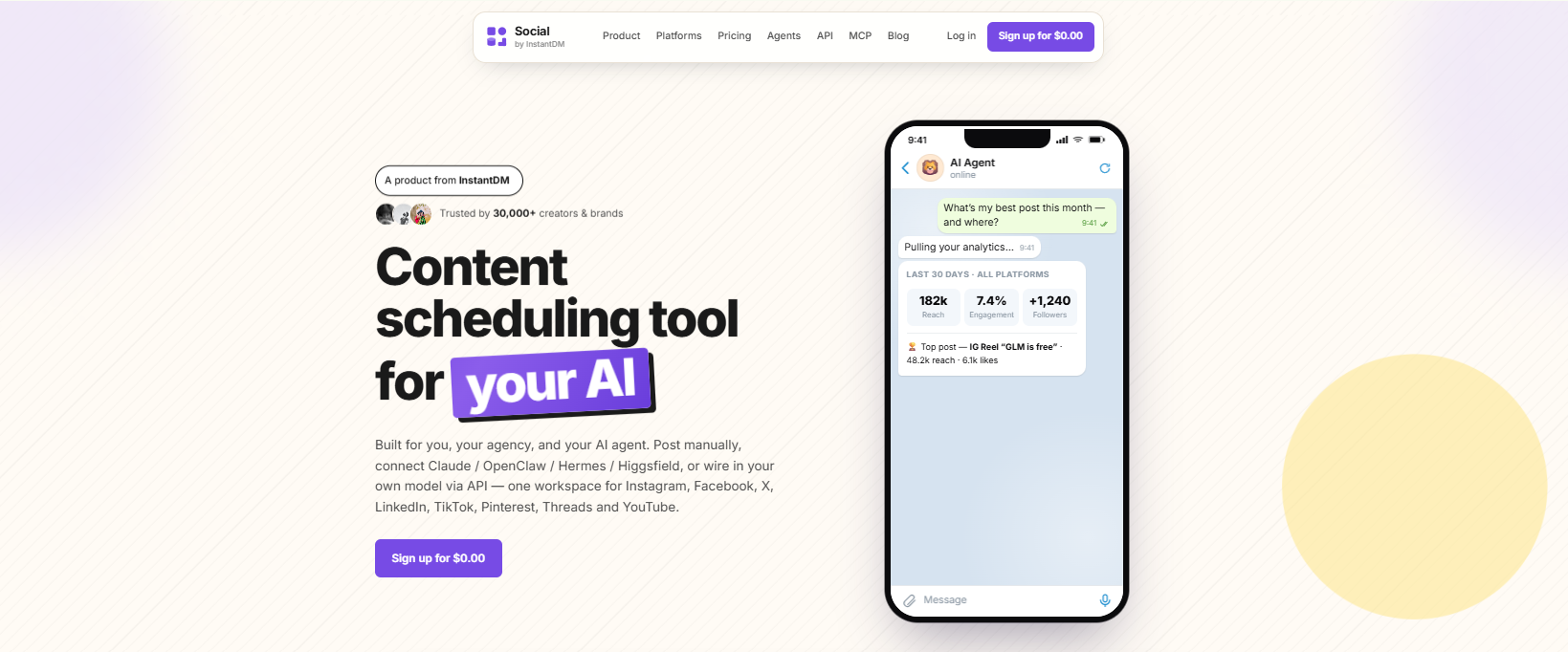
Social by InstantDM has a free plan with unlimited scheduled posts across eight platforms along with AI agent integration included. There’s no nonprofit discount here simply because the free plan is already generous enough that most organizations won’t need one.
Canva for Nonprofits gives verified organizations a completely free upgrade to Canva Pro, which covers designing social graphics, presentations, and other marketing materials without any cost attached.
Meta Business Suite is free outright, and it handles scheduling for both Facebook and Instagram along with basic analytics thrown in.
Hootsuite offers nonprofit pricing with a 50 percent discount on its Professional plan, bringing the starting cost down to around $49 a month.
Later also offers a 50 percent nonprofit discount, starting at roughly $12.50 a month once that discount is applied.
SocialBee follows the same pattern with a 50 percent nonprofit discount, starting around $14.50 a month.
TechSoup deserves a mention on its own, separate from any single tool. Setting up an account there gives you access to discounts across a whole range of software, since a lot of these nonprofit pricing programs are actually distributed through TechSoup rather than handled directly by each individual company.
Best tools for scheduling nonprofit social media posts
If scheduling specifically is your priority, here’s how these tools stack up.
Buffer handles simple scheduling across more than ten platforms, with a free plan covering three channels and that same 50 percent nonprofit discount available on paid tiers.
Social by InstantDM offers AI-powered scheduling across eight platforms, with a free plan that includes unlimited posts. The AI agent integration genuinely saves time when nobody on your team has the bandwidth to write every caption from scratch.
Metricool works well as a budget option, with a free plan covering one brand across every platform it supports and paid plans starting around $22 a month if you need more.
Later brings visual scheduling with its grid preview feature into the mix, and it comes with that same 50 percent nonprofit discount applied.
Meta Business Suite remains free and covers Facebook and Instagram scheduling specifically. It’s basic, but it genuinely gets the job done for organizations that don’t need anything more elaborate.
For most nonprofits, Social by InstantDM ends up being the strongest overall pick here. A free plan with unlimited posts and AI features built in is hard to match, and nothing else on this list comes particularly close at that price point.
Best tools for managing multiple nonprofit social accounts
If you’re managing accounts across several programs or chapters, you need something built to handle multiple accounts without becoming a mess.
Buffer supports multiple accounts once you’re on a paid plan, and that 50 percent nonprofit discount still applies there.
Social by InstantDM’s free plan supports eight platforms per account along with AI agent integration, which covers a lot of ground even before you look at paid options.
Hootsuite tends to be the strongest fit for teams managing several accounts at once, thanks to its built in approval workflows, and nonprofit pricing is available here too.
SocialPilot is a genuinely affordable option for teams, supporting multiple accounts starting around $30 a month for up to ten accounts.
Metricool’s free plan covers just one brand, though its paid tiers open up support for managing multiple brands as your needs grow.
For nonprofits juggling several accounts specifically, Hootsuite or SocialPilot tend to be the strongest choices, since both come with real team features and genuine multi account support baked in.

Social media tools for volunteer and team collaboration
If your social media presence is run by volunteers or a small team rather than one dedicated person, collaboration features become a real priority.
Hootsuite tends to be the strongest option here, with approval workflows, role based access, and shared calendars all built in to support exactly this kind of setup.
Buffer supports team collaboration once you’re on a paid plan, and again, the 50 percent nonprofit discount applies.
Social by InstantDM’s AI agent integration is genuinely useful in a volunteer context specifically since it means a volunteer can describe a content idea in plain language and have it drafted automatically rather than needing strong writing skills to contribute meaningfully.
Planable offers a visual approval workflow that lets your team preview and sign off on content before anything actually goes live, which is handy if you want an extra layer of oversight.
Canva for Nonprofits also supports team collaboration on designs, and it remains free for verified organisations.
The real key across all of these is finding a tool that lets multiple people contribute without everyone stepping on each other’s work or duplicating effort by accident.
Best tools for nonprofit analytics and campaign reporting
Being able to show your board and your donors that social media is actually working matters, so here’s where the analytics genuinely hold up.
Buffer gives you basic analytics on its free plan, with more detailed reporting available once you move to a paid tier.
Social by InstantDM covers analytics across all eight of its supported platforms, with AI-powered insights layered on top to help make sense of the numbers.
Metricool offers solid analytics for the price, and it even includes some competitor analysis, which is a nice bonus most tools in this price range skip entirely.
Hootsuite has genuinely advanced analytics, including custom reports that are specifically useful for putting together a board presentation without a lot of manual work.
Sprout Social has the strongest analytics of everything mentioned here, though it comes at a price point that puts it out of reach for most nonprofit budgets.
For the majority of nonprofits, Buffer or Social by InstantDM will give you enough to actually demonstrate impact without needing to stretch for something like Sprout Social.

How nonprofits can plan a social media content calendar
Here’s a simple process that’s worked well for the organisations I’ve helped set this up.
Start by choosing your platforms, and resist the urge to be everywhere at once. Picking two or three to focus on properly beats spreading yourself thin across six.
From there, plan out your content pillars, somewhere around three to five recurring themes like impact stories, volunteer spotlights, upcoming events, behind-the-scenes glimpses, and clear calls to action.
Build an actual monthly calendar next, mapping out roughly what you’ll post each week. A simple spreadsheet works fine for this, though a tool like Social by InstantDM can carry that plan straight through to scheduling as well.
Batch create your content rather than writing something fresh every single day. Sitting down once a week and creating everything for that week in one sitting is dramatically more efficient than trying to come up with something new each morning.
Schedule everything in advance once it’s created. Using a scheduling tool to publish automatically saves real time and, just as importantly, keeps your posting consistent even during a busy week.
And finally, check your analytics on a regular basis, ideally weekly, so you can see what’s actually resonating and adjust your plan accordingly rather than sticking rigidly to a calendar that isn’t working.
Frequently asked questions
What tools are recommended for managing social media for nonprofits?
Buffer, Social by InstantDM, Meta Business Suite, Canva for Nonprofits, and Hootsuite are the most commonly recommended tools. Social by InstantDM stands out for its free plan with AI features included.
How can nonprofits effectively use social media to increase awareness?
Posting consistently, sharing content your community creates on its own, running themed campaigns, partnering with micro-influencers, and using paid advertising thoughtfully all genuinely help. Tools like Social by InstantDM make the scheduling side of this much easier to manage.
What are the best social media platforms for non-profit organisations?
Facebook and Instagram matter most for the majority of nonprofits. LinkedIn is worth adding for corporate partnerships, TikTok for reaching younger audiences, and YouTube if you have longer-form content worth sharing.
Do nonprofits get discounts on social media tools?
Yes, genuinely. Buffer, Hootsuite, Later, and SocialBee all offer a 50 percent nonprofit discount. Canva offers a completely free upgrade to Pro for verified nonprofits. Setting up a TechSoup account is worth doing early, since it gives you access to several of these discounts in one place.
How often should nonprofits post on social media?
Somewhere around three to five times a week on each platform tends to work well. Consistency matters more than raw volume, so posting three times every week beats posting ten times one week and then going quiet the next.
The bottom line
Nonprofits need tools that are genuinely affordable and that help tell their story while building real community, not software priced with a business’s marketing budget in mind. The good news is that the best tools in 2026 offer either real free plans or meaningful nonprofit discounts, so paying full price simply isn’t necessary.
Buffer works well if simplicity is your priority. Social by InstantDM stands out for AI-powered scheduling on a genuinely free plan. Canva for Nonprofits covers your design needs at no cost. Meta Business Suite handles free scheduling for Facebook and Instagram. Hootsuite fits teams that need deeper collaboration features.
Setting up a TechSoup account early is worth the ten minutes it takes, since it opens the door to discounts across several of these tools at once. Start with whatever’s free, and only upgrade once you’ve genuinely outgrown it.
Your cause deserves to be seen, and the right combination of tools makes that possible without draining a budget that’s already stretched thin.