How Instagram Collab Posts Work & How To Get Accepted (2026)
Instagram collab posts allow two accounts to share a post. How they work, how to make them and how to get accepted.

TL;DR:
Instagram Collab posts are shared posts that two or more accounts create and that appear on all their profiles. The likes, comments, and engagement all go into one big pot, meaning double the reach without double the work. You must invite a collaborator via the “Tag People” menu before you publish to make one. They get a DM alert and have to accept it before the post is visible on their profile. Feed posts and Reels are good for collab posts, but not Stories. You can schedule them with tools like Social by InstantDM, but the collaborator still has to accept the invite manually.
What is an Instagram collab post?
Okay so here’s the scoop. An Instagram collab post is a post that is on two (or more) profiles at the same time. You and your collaborator post the same thing, rather than you posting something and your collaborator posting it separately. Same story. Same caption. Same comments section. Everything is the same.
The magic is in pooling engagement. A collab post combines two posts into one, aggregating all likes, comments, and saves from both audiences instead of having two distinct posts. So if your audience has 200 likes and your collaborator has 300, the post will display 500 likes in total. That’s way more social proof than you could ever get on your own.
The feature was launched a few years ago, but in 2026 it’s become one of the most effective growth hacks on Instagram. It’s used by brands. Creators use this. Even local businesses use it. And for good reason – it’s almost free to reach.

So what’s the deal with collab posts, then?
The mechanic is fairly simple. Here’s the flow.
Create your post as usual. Select your photo or video, add your caption, and add hashtags. You tap “Tag People” before publishing, then choose “Invite Collaborator.” Find the account you are keen to collaborate with and send the invite.
The account receives a DM notification that you have invited them to be a collaborator. They tap the notification, view the post, and select “Accept” or “Decline.”
If they accept, then the post will instantly show up on their profile grid alongside your own. You can find both account names at the top of the post. The engagement is a pool. All are winners.
If they say no, the post is still live on your profile. It just doesn’t show up on their end. Sorry.
Remember the key thing: the person who creates the post owns it. Later they can edit the caption, delete the post, or remove the collaborator. The collaborator can’t do any of that, but they can accept or decline the invite.
How to do a collab post on Instagram
This is the process step-by-step I use every time.
Step 1: Write your post. Open Instagram and click the plus button. Create your post as you normally would. Choose your photo or video, type your caption, and include your hashtags.
Step 2: Hit “Tag People” before posting. Here you would normally add location tags or tag other accounts in the photo.
Step 3: Tap on “Invite Collaborator”. This will be right next to “Add Tag”. If you don’t see it, double-check your app is updated to the latest version.
Step 4: Search for the account you want to collaborate with. Enter their username and select them from the results.
Step 5: Post your post. We’ll DM the collaborator your invite.
Step 6: Wait till they accept. Once they do, the post will appear on both profiles.
That’s it. All of this takes about 2 minutes for your part. How long you wait is contingent upon how quickly your collaborator responds.
Something to remember: you can invite five collaborators for each post. So if you’re doing a group collaboration, you can add multiple accounts.

How to see if someone reposted your Instagram post
I get asked this question a lot, and the answer is both simple and annoying. Instagram doesn’t send you an actual notification when someone uses your post as a collab on their feed.
But here’s the thing you can do.
Look at the insights on your post. Tap on your post, then tap on “Insights” to see a breakdown of how people found it. If you see a spike in “From [username]” or “From Shares”, it’s a sign someone shared it.
Check your collaborator’s profile. If you think someone shared your post as a collab, go to their profile and see if it appears on their grid. If it does, your post will appear there with the names of both accounts at the top.
Look at your notifications. If someone shares a post as a collab, you will receive a notification in your Activity feed. Look for something like “@username shared your post.”
Ask up front. If you’re working with a creator or brand and want to know if they posted your content, just ask. Most people are glad to confirm.
The fact is, the notification system of Instagram isn’t perfect. Sometimes shares just drop through without any notification. But if you’re actively looking at your insights and your collaborator’s profile, you’ll catch most of these.
How to delete a collab post from your profile grid
Alright so here’s a situation no one talks about until it happens. You accept a collab invite, the post goes to your grid, and then you decide you don’t want it there anymore. Perhaps it just doesn’t fit your style. Maybe the caption is spelt wrong. Perhaps you just changed your mind.
Here’s how to get rid of it.
If you are the original poster (the person who created the post): You can remove the collaborator by going to the post, tapping the three dots, selecting “Edit” and then removing the collaborator from the “Tag People” section. It will remain on your profile but will be removed from theirs.
If you’re the collaborator (the person who accepted the invite): You can remove the post from your grid by going to your profile, finding the post, tapping the three dots and selecting “Remove from Profile Grid”. This doesn’t delete the post — it simply hides it from your grid. The original poster’s profile still has the post up.
To delete the post completely: Only the original poster can delete it. The collaborator cannot delete someone else’s content. If you want a collab post gone altogether, you’ll need to ask the original poster to take it down.
Important: Deleting a collab post from your grid will not undo the engagement of a collab post. You can no longer see the likes and comments that happened while it was on your profile, but the original post still has them.
Who Can Use Instagram Collab Posts?
This is the question that matters. Short answer: yes, but there’s a catch.
You can schedule the original post to go out at a specific time using a scheduling tool. However, the collaborator will still have to accept the invite manually once the post goes live. “There’s no way to automate that step; the collaborator has to tap ‘Accept’ themselves.
So the workflow is something like this: You schedule your collab post to go live at, for example, 9 AM. The post appears on your profile at 9 AM, and the collaborator receives a DM notification. They have to open Instagram, see the notification and accept the invitation. Once they do, the post will also appear on their profile.
For the scheduling part, you can use tools like Social by InstantDM. You can plan your collab posts with your regular content and they can be posted at optimal times. The collaborator acceptance step is manual; everything else can be automated.
Timing is everything. If you schedule it for 9 AM and your collaborator doesn’t accept until 5 PM, your post is on your profile for only eight hours. That’s 8 hours of lost engagement with their audience. So consult with your collaborator before you set it up.
Why you should do collab posts for growth
I’ve been using collab posts for about a year now and here’s what I’ve observed.
Growing our reach. Collaborating with someone whose audience is different than yours means you’re essentially being exposed to a whole new set of people. That’s organic reach. You can’t buy it any other way.
Social proof. A post that has 500 likes just looks so much better than one that has 200 likes. When both audiences share the same post, the social proof instantly doubles.
Algorithmic kick. Instagram’s algorithm loves interaction. If a collab post gets high engagement from two different audiences, the algorithm pushes it out to even more people. It’s a snowball effect.
Building Relationships. Collab posts help you to build relationships with other creators and brands. Those relationships lead to more collaborations, shoutouts, and opportunities down the line.
Variety of content. Partnering with someone outside your niche lets you create content that you wouldn’t normally create. This keeps your feed fresh and your audience engaged.
How to get collab posts approved
It’s not always easy to get someone to say yes to your collab invite. Here’s what really works.
First, build a relationship. Don’t DM a stranger you haven’t interacted with asking for a collab. Comment on their post Distribute their content. Ask after you’ve built rapport.
Make the value obvious. When you send your collab invite, include a DM about why this collab is good for both of you. “Hey, I think our audiences would love this content together” is better than sending an invite with no context.
Select the right partners. Work with people who have the same audience as you, but not the same. If you both target the same people, there’s no benefit in terms of growth. If your audiences are completely different, the content may not resonate with either.
Start small. Looking for collab partners? Reach out to creators with similar follower counts. Big accounts don’t usually work with small accounts unless there is a clear benefit for both.
Polite follow-up If you don’t hear back from your invite in a few days, send a gentle follow up. “Hey I just wanted to follow up and see if you got my collab invite - let me know if you have any enquiries.
Collab Post Best Practices 2026
Here’s what I’ve learned from doing a lot of these.
Coordinate your captions. Make sure both accounts agree on the caption before publishing. Nothing worse than a collab post with a caption that only makes sense from one side.
- Tag relevant accounts. Tag the collaborator and any brands, locations or other accounts mentioned in the post. It improves discoverability.
Use appropriate hashtags. Both accounts should use the hashtags that will reach their target audiences. Don’t just reuse the same hashtags, think about what each audience searches for.
Tweet at the right times. Work with your collaborator to establish the time to post when both audiences are most active. Check your insights for best times to post.
Interact with comments from both audiences. As the post goes live, both accounts should be responsive to comments. This shows the audiences that you’re engaged in the discussion.
Typical collab post errors
I see these all the time and they are easy to avoid.
No communication before posting. Don’t post a collab without talking to your collab partner first, you’re going to cause confusion. Talk about the content, caption and timing before.
Choosing the wrong partner. Working with someone whose audience is the complete opposite might sound like a growth hack but usually backfires. The content needs to make sense for both audiences. The content should make sense for both audiences.
Ignore the DM notification. If you don’t respond to a collab invite for a week, the opportunity is dead. Do check your notifications often.
Too much. Posting collab content every day will make your audience tired of seeing different faces on your feed. Collaborate strategically, not constantly.
Not remembering to engage. A collab post isn’t a set and forget thing. Both accounts need to interact with comments and DMs after posting.
Collab posts vs regular posts vs tagged posts
People mix these up all the time so let me clear it up.
Regular post: You post something. It’s visible only in your profile. Your engagement is only as good as your audience.
Tagged post Someone posts a photo and tags you in the photo. You’ll see the photo in your “Tagged” tab but not on your grid. You don’t get any engagement on your profile.
Collab post: A post that you share with another account It appears in both profiles. The engagement is pooled. Both audiences see it.
The collab post is the only thing that gives you the engagement benefits on your real profile. Tagged posts are great for relationship building, but they don’t do anything for your grid or your metrics.
The Role of Scheduling Tools in Collaboration Posts
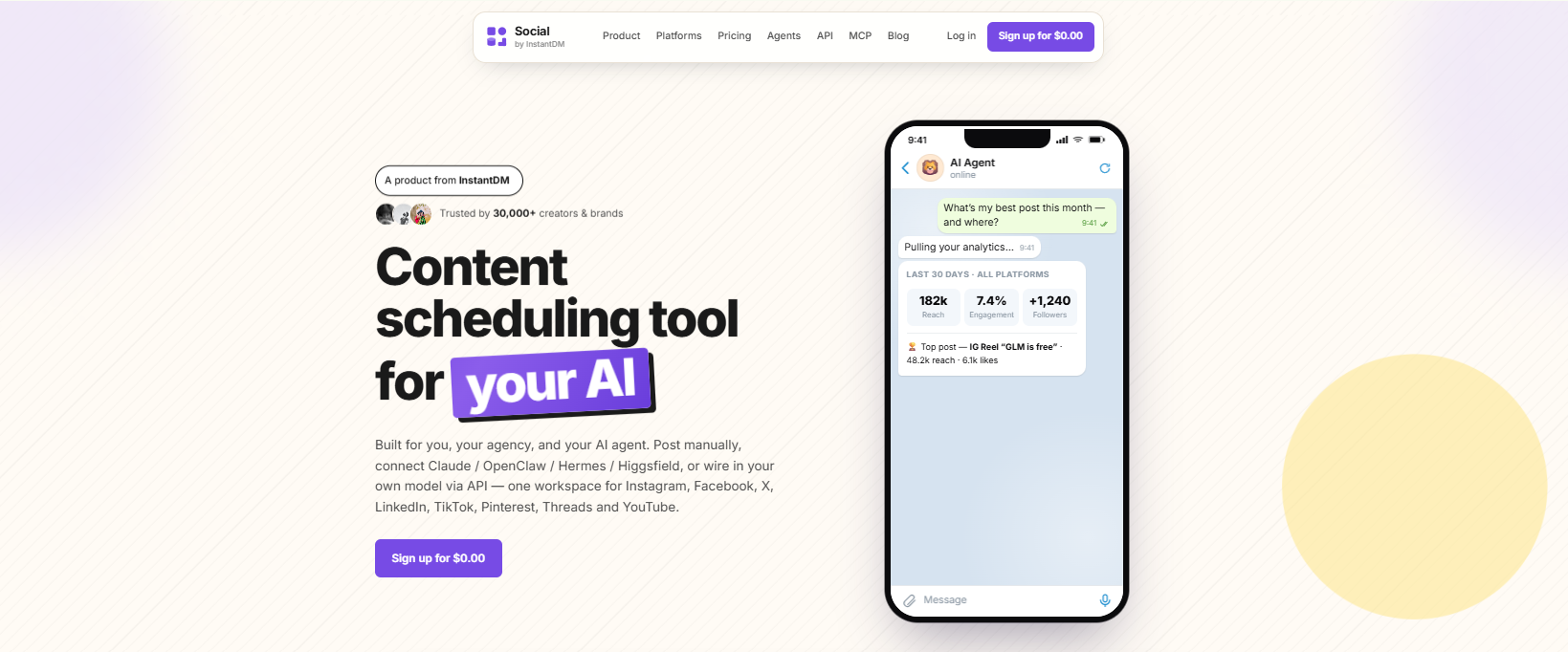
I’ve said this before, but it’s worth expanding on. Scheduling tools can’t automate the collaborator acceptance step, but they can automate all the rest.
Social by InstantDM lets you schedule collab posts on multiple platforms. You can schedule your Instagram collab with your regular content calendar and have it go live at just the right time. The scheduling and planning part is finished, but the collaborator still needs to accept manually.
This is particularly useful if you do a lot of collabs each month. You can create them in batches and schedule them in batches, rather than posting them individually. And the time saved adds up fast.
Collab Post Etiquette
There is more to unwritten rules than most people think.
Credit the original creator at all times. Even if both names appear on the post, make sure your caption adequately credits the collaboration.
Don’t delete the post too early. Accept a collab invite and keep it up on your grid for a week before removing it. Take it off too early and it looks bad.
Reply to comments promptly. Both are interacting with the comments. It’s like a one-sided collaboration when one person does all the work.
Be honest about what you expect. If you want the collab to equal a specific thing — sales, followers, brand deals — say so up front. Don’t expect the impossible.
Analytics for collab posts: what to track
Post-Live Checklist for Instagram Collab Posts
Reach, by source. How many people saw the post from your audience vs collaborators audience? This is how you can tell who contributed more.
Engagement Rate 2. Is your engagement rate higher than your average post? Yes collabs are working for you if.
Growth of followers. did you get followers from the collab? Monitor your follower count for 48 hours after you post.
Profile views. “People are going to your profile after seeing the collab? This shows an interest in your other content.
Saves and shares. These are the strongest signals of intent to engage. If your collab post is saved and shared, it’s resonating.
Keep track of these metrics for each collab. After 5 or 10 collabs, you’ll have enough data to see which types of collabs work best for your account.”
Good collab post ideas
Here are some content ideas that typically do well as collabs:
Behind-the-scenes stuff. Show both accounts doing something together. People want to see how it’s done.
Joint tutorials. Create a how-to post that merges the expertise of both accounts. “We [did something together]. How?” works really well.
Co-designs for the brand. If you are working on something together, a collab post is a good way to tell both audiences at the same time.
Event coverage. If you both are at the same event, post a collab about the experience. The two audiences see it from two perspectives.
Posts celebrating. Reach a milestone? Share it with a collaborator that helped you get there. That boost of engagement feels good and it strengthens the relationship.
The best collab posts feel organic. They don’t feel like promotions or forced. They just feel like two people that really want to share something together.
FAQs
How many collaborators can I add to 1 Instagram post?
You can add up to 5 collaborators to each post. All of them have to accept before it shows up on their profiles.
Can I add a collaborator after I’ve already posted?
Yes, but it’s limited. You can add a collaborator after publishing a post, but it is better to invite them before publishing. There are some reports from people of trouble adding collaborators to posts that have been live for a while.
Can you do collab posts with Reels?
Yes. Both Feed posts and Reels support collab posts. It’s the same process as before: Invite a collaborator prior to publishing it; they accept, and the Reel appears on both profiles.
What if my collaborator deletes their account?
When the collaborator deletes their account, the post will remain on your profile but will be removed from theirs. Your post also still has the original stats. They are missing their side of the engagement that happened while it was on both profiles.
Can I use collab posts for paid partnerships?
Yes, and you ought to. If it’s a paid collab, the collab feature puts the post on both profiles and combines the engagement. Just make sure to follow Instagram’s rules for disclosing the partnership.
Conclusion
Instagram collab posts are one of the best growth tools in 2026. They allow you to tap into someone else’s audience, merge your engagement and connect with other creators and brands – all with one post.
The setup is easy: create your post, add a collaborator, wait for them to accept, and watch the engagement roll in. The easy part is the technical setup. The hard part is finding the right collaborators and building relationships that make them want to say yes.
If you’re planning multiple collab posts, then tools like Social by InstantDM (https://socialbyidm.com) can do the planning and scheduling for you so you can focus on the creative work. The collaborator acceptance step is manual, but the remaining steps can be automated.
Begin with a single collab. Let’s see what it does. Then do more. “That’s the idea.
Frequently asked questions
How many collaborators can I add to 1 Instagram post?
You can add up to 5 collaborators to each post. All of them have to accept before it shows up on their profiles.
Can I add a collaborator after I've already posted?
Yes, but it's limited. You can add a collaborator after publishing a post, but it is better to invite them before publishing. There are some reports from people of trouble adding collaborators to posts that have been live for a while.
Can you do collab posts with Reels?
Yes. Both Feed posts and Reels support collab posts. It's the same process as before: Invite a collaborator prior to publishing it; they accept, and the Reel appears on both profiles.
What if my collaborator deletes their account?
When the collaborator deletes their account, the post will remain on your profile but will be removed from theirs. Your post also still has the original stats. They are missing their side of the engagement that happened while it was on both profiles.
Can I use collab posts for paid partnerships?
Yes, and you ought to. If it's a paid collab, the collab feature puts the post on both profiles and combines the engagement. Just make sure to follow Instagram's rules for disclosing the partnership.