Instagram Trial Reels: The Complete Guide to Testing Content Risk Free
The Complete Guide to Testing Content (2026)
TL;DR
Trial Reels let you show a Reel to people who don’t follow you before you ever decide whether your actual followers get to see it. That matters because a Reel that flops in front of your followers can quietly drag down how your future posts get treated by the algorithm, while a Trial Reel that flops just gets deleted with nobody the wiser. It’s a free feature, it’s already built into Instagram, and once you get into the habit of using it, it genuinely changes how you approach posting. I schedule my regular content and my Trial Reels together through Social by InstantDM these days, mostly because it saves me from juggling two separate workflows.
Introduction
I’ll be honest, I ignored Trial Reels for a while after they rolled out because I assumed it was just another toggle Instagram added that wouldn’t really change much in practice. I was wrong about that, and it took watching one of my own Reels quietly bomb in front of my actual followers to realize how much safer testing with strangers first actually is.
What follows is everything I’ve picked up after using Trial Reels regularly for a few months now, how they actually work under the hood, who’s allowed to use them, the exact steps to post one, what separates them from a normal Reel, which numbers are actually worth watching, and the mistakes I see people make constantly that quietly waste the whole feature. If you make Reels even occasionally, this is one of those small workflow changes that ends up paying off far more than the thirty extra seconds it costs you.
I’d also add that this isn’t just a trick for big accounts with an established audience. If anything, it matters more for smaller accounts, since every single follower you have took real effort to earn, and a string of underperforming Reels landing directly in front of them is a much bigger setback when your audience is still small than when you’ve already got tens of thousands of people to absorb the occasional miss.
What are Instagram Trial Reels and how do they work?
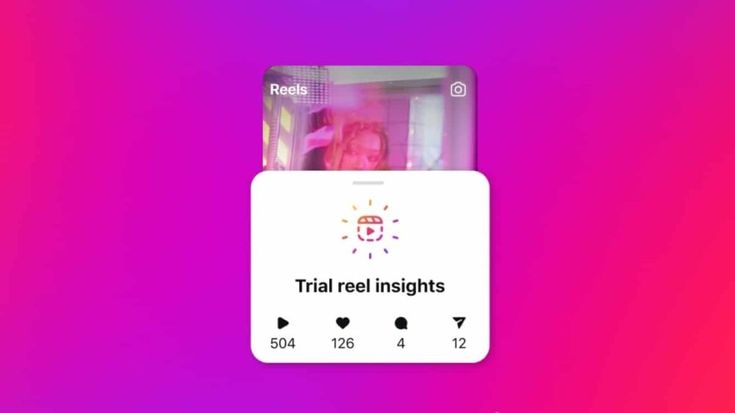
Let me start with the basics since this trips people up more than it should. A Trial Reel is just a regular Reel with one extra switch flipped on before you hit post. That switch tells Instagram to hold the Reel back from your followers entirely and instead only serve it to people who don’t follow you yet, through the main Reels feed and Explore.
Here’s what actually happens step by step. You put together a Reel the same way you always would. Right before posting, you flip on the Trial Reel toggle. From there Instagram shows it exclusively to non followers. Somewhere between 24 and 72 hours later you get a clear read on how it did. If the numbers look good, you can push it out to your followers too. If they don’t, you simply delete it and nobody who follows you ever knew it existed.
What makes this genuinely useful is the risk it removes. Post a Reel straight to your followers and have it flop, and the algorithm takes note of that. It can quietly reduce how far your future content travels. Trial Reels sidestep that entirely, since only the Reels you actually choose to share with your followers count toward your account’s engagement history.
I started leaning on Trial Reels about three months back and it changed my whole approach to posting. Pretty much everything goes through a trial run now before it ever touches my main feed.
What surprised me most is how it changed my willingness to experiment in the first place. Before I had this option, I found myself sticking to formats I already knew worked, because trying something genuinely new felt risky when a flop would land directly in front of everyone who already followed me. Once that risk got removed, I started trying formats I’d normally have talked myself out of, and a few of them turned into some of my best performing content once I actually shared them with my full audience.
Who can use Trial Reels in 2026?
Trial Reels are open to most accounts on Instagram at this point, so let me walk through exactly who qualifies.
Any creator can use them regardless of follower count. There’s no minimum threshold here, an account sitting at 100 followers has just as much access as one sitting at 100,000.
Business accounts can use them too, which matters a lot if you’re running a brand page or a local business profile, since testing content before it reaches your audience is arguably even more valuable when you’re representing a company rather than just yourself.
Creator accounts get full access as well, no restrictions there.
The one real limitation is that your account needs to be public. Private accounts simply can’t use the feature, which makes sense once you think about it, since the entire premise depends on showing content to people outside your existing circle of followers.
I actually tested this myself on a fresh account that only had 50 followers, mostly out of curiosity about whether smaller accounts got the same treatment. It worked exactly as expected. The Reel went out to non followers and the analytics came back just as detailed as they do on my main account.
One thing worth flagging for business accounts specifically, if you manage a page on behalf of a client or a brand, the same public account requirement applies there too. I’ve run into a couple of situations where a client’s account was set to private for reasons unrelated to social strategy, and switching it to public was the first step before Trial Reels could even be tested at all.
How to post a Trial Reel step by step
Here’s the process laid out plainly, start to finish.
First, put your Reel together the normal way, whether that’s recording fresh footage or uploading something you already have. Add whatever effects, music, or text overlays you’d normally include.
Second, tap next to move over to the sharing screen.
Third, look for the Trial Reels toggle sitting near the bottom of that screen and switch it on.
Fourth, decide on your preferences. You can let Instagram automatically push the Reel out to your followers if it performs well, or you can hold off and make that call yourself once you’ve seen the numbers.
Fifth, hit share. Your Trial Reel goes live at that point, but strictly to non followers.
Sixth, give it some time, somewhere between 24 and 72 hours, and then go check how it actually performed.
Seventh, make your call. Share it if the numbers look strong, or quietly delete it if they don’t.
The whole thing adds maybe thirty seconds compared to posting a regular Reel. That one toggle is really the only extra step involved.
Trial Reels vs regular Reels: what’s actually different?
Let me lay out the honest comparison between the two.
A Trial Reel is only visible to non followers. It doesn’t touch your account’s algorithm performance until you actively choose to share it. It lets you test content without any real downside. You can quietly delete a flop and nobody following you will ever know it existed. The analytics you get back show you specifically how strangers responded to it.
A regular Reel goes out to your followers and non followers at the same time. It affects your account’s algorithm standing immediately, whether it does well or poorly. There’s no safety net built in, so if it flops, your entire audience sees that happen. And there’s no quiet way to pull it without your followers noticing something’s missing.
The core difference really comes down to risk. Trial Reels give you a way to test without consequences attached. Regular Reels are fully committed the moment you post them.
Who can see your Trial Reel before you share it with followers?
Only non followers see your Trial Reel by default. Your existing followers won’t come across it through their regular feed or Stories.
That said, there are a few edge cases worth knowing about. A follower could still stumble onto it if someone sends it to them directly through DM, if they land on a page that aggregates Reels sharing the same audio, location tag, or filter, or if they happen to come across it through Explore, though that last one is unlikely given how Instagram weights distribution there.
It’s worth being clear that Instagram isn’t hiding the content in some encrypted way, it’s simply controlling who it actively pushes the Reel toward. The Reel still technically exists on the platform, Instagram just doesn’t proactively show it to people who follow you.
In my own experience, I’ve never once had a follower mention seeing a Trial Reel of mine before I decided to share it more broadly. The distribution controls genuinely seem to hold up in practice.
I will say that the DM exception is the one to keep in mind if you’re testing anything sensitive, like an early announcement or something you’d rather your existing audience not see ahead of time. Someone outside your follower list can technically still forward it to a friend who does follow you, so if the content genuinely needs to stay under wraps until you’re ready, treat the Trial Reel toggle as a distribution control rather than a hard guarantee of privacy.
How long should you test a Trial Reel before checking results?
The standard window Instagram gives you runs from 24 to 72 hours, and here’s how I’ve come to use that range.
At 24 hours you’ve got the bare minimum of data. You’ll get a sense of early performance, but it’s often too soon to make a confident call either way.
At 48 hours you’re usually sitting in the sweet spot. That’s typically enough data to actually decide with some confidence.
At 72 hours you’re looking at the outer edge of the testing window. Performance has generally leveled off by this point, so waiting much longer than that doesn’t tend to add useful information.
I personally check in around the 48 hour mark most of the time. That gives me a solid enough read without dragging things out. If a Reel is clearly taking off within the first 24 hours, I’ll go ahead and share it early. And if it’s obviously falling flat that early on too, I’ll just delete it rather than wait out the full window.
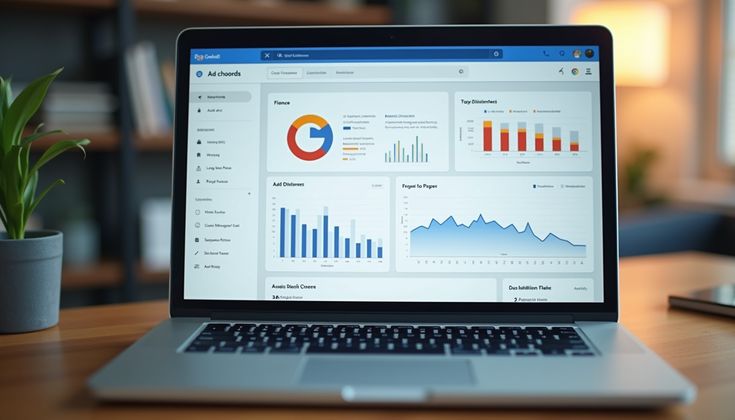
What Trial Reel metrics should you track?
Here’s what’s actually worth paying attention to once your test period wraps up.
View completion rate matters most. This tells you what percentage of people watched all the way through, and anything at 30 percent or higher is generally a good sign.
Saves per view is another strong signal. A save roughly once per hundred views is a reasonable benchmark to aim for.
Shares per view follows a similar logic. One share per hundred views is solid territory.
Comments per view tends to run lower naturally, so one comment per two hundred views is a decent target.
Likes per view is worth glancing at, but it’s genuinely the least meaningful of the group. Likes are easy to give and don’t tell you much about whether the content actually landed.
If I had to pick just one number to watch, it would be completion rate every time. When people stick around to watch the whole thing, that’s the clearest sign the content itself is working. Everything else is useful, but secondary.
It’s also worth tracking these numbers against your own historical average rather than some universal benchmark you found online. A 25 percent completion rate might be genuinely disappointing for one account and a strong result for another, depending entirely on what your typical content usually pulls in. I keep a simple running average of my last ten or so regular Reels just so I have something honest to measure each new Trial Reel against, rather than comparing myself to numbers that have nothing to do with my actual audience.
When should you share a successful Trial Reel with everyone?
My personal rule of thumb goes like this. I’ll graduate a Trial Reel to my followers if it beats my recent regular Reel average on at least two out of three core metrics, completion rate, saves per view, and shares per view.
If a Trial Reel triples my usual average on even just one of those metrics, I’ll share it right away without waiting for the rest of the window. That kind of spike is a pretty clear signal something about it genuinely resonated.
If a Trial Reel lands roughly in line with my usual numbers, I generally leave it as is and don’t push it further. It’s not a bad piece of content, it’s just not standout enough to be worth sharing more broadly.
And if it comes in below my usual average, I just delete it. Nobody following me ever sees it happen, so there’s no real cost to walking away from it.
This is honestly where a scheduling tool starts to matter beyond just convenience. I run my Trial Reels and my regular content through Social by InstantDM now, which makes it a lot easier to keep the whole testing workflow organized rather than juggling it manually inside the Instagram app alone.
Keeping a simple log matters too, even a basic spreadsheet works fine. I jot down what the Reel was about, which hook I used, and how it performed against my average. After a few months of doing this, patterns start showing up that aren’t obvious from any single test on its own, certain topics or formats that consistently beat my average regardless of the specific execution, which ends up shaping what I bother testing in the first place.
Why your Trial Reels aren’t getting views, common mistakes
I keep seeing the same handful of mistakes show up again and again, so let me flag them here.
Testing too many things at once is probably the biggest one. A Trial Reel only tells you something useful if you’re changing a single variable at a time. Swapping the sound, the posting time, and the text overlay all in one go just means you won’t know which change actually mattered.
Posting at a weak time is another common issue. Trial Reels still tend to perform best during peak windows, generally somewhere around 11 in the morning to 1 in the afternoon, and again from 7 to 9 in the evening.
Ignoring the hook is a mistake I still catch myself making occasionally. Those first one to three seconds decide whether someone keeps watching or scrolls right past. A useful trick is putting together two versions of the same Reel with different opening hooks and running both as separate Trial Reels, then letting whichever one gets the higher completion rate tell you which hook actually works.
Not checking your results at all defeats the whole purpose. If you post a Trial Reel and never circle back to look at the numbers, you might as well not have used the feature in the first place. Check in around 48 hours and actually make a call.
And sharing too early is its own trap. A handful of early views isn’t enough reason to push a Reel out to your followers. Let the data actually accumulate before you decide anything.
Best Trial Reel ideas for creators, brands, and local businesses
Here are ten ideas that consistently work well as Trial Reels, worth testing before you commit any of them to your main feed.
Before and after transformations tend to perform well, whether that’s a room makeover, a fitness journey, or watching a dish come together from start to finish.
Quick tips or hacks work nicely too, something delivered in under fifteen seconds along the lines of one thing you wish you’d known sooner about a given topic.
Behind the scenes footage, showing your workspace, your process, or just a normal part of your day, tends to build genuine connection.
Trending audio applied with your own twist can work well, taking a sound that’s already circulating and adapting it to fit your specific niche.
A controversial opinion or hot take within your industry tends to drive real engagement, since people love weighing in when they disagree or agree strongly.
A day in my life format, walking through a typical day from morning to night, gives people a sense of who’s actually behind the account.
A product demo, kept short and visually clear, works well if you’re trying to show something in action rather than just describe it.
Reshared customer testimonials or reviews add a layer of social proof that’s hard to manufacture any other way.
Myth busting content, taking a common misconception in your field and correcting it, tends to hold attention because it feels genuinely useful.
And a challenge or small contest inviting your audience to participate tends to spark engagement that carries well beyond the Reel itself.
Run all of these as Trial Reels first. Whatever performs well with strangers tends to land just as well once it reaches your actual audience.
Frequently asked questions
Do Trial Reels work? Yes. Trial Reels are one of the most effective content testing strategies on Instagram in 2026. They let you test content risk-free before sharing with your followers.
Do Trial Reels on Instagram help increase engagement? Yes. By testing content with non-followers first, you can identify high-performing Reels before they affect your account’s algorithm performance. This leads to better engagement overall.
How do I post a Trial Reel on Instagram? Create a Reel, go to the sharing screen, toggle on “Trial Reels,” and post. The Reel will be shown only to non-followers. After 24 to 72 hours, check the analytics and decide whether to share it with your followers.
What is a Trial Reel on Instagram? A Trial Reel is a Reel that’s shown only to non-followers instead of your entire audience. It lets you test content performance without risking your account’s algorithm standing.
How can I create effective Trial Reels for Instagram? Test one variable at a time, focus on the first 1 to 3 seconds, post during peak hours, and check results at 48 hours. Use tools like Social by InstantDM to schedule your Trial Reels alongside regular content.
The bottom line
Instagram Trial Reels are honestly one of the smarter tools available for growth right now. They let you test content against a stranger audience before deciding whether your actual followers see it at all, which cuts down risk and, over time, noticeably improves the quality of what actually makes it to your main feed.
The workflow itself is simple enough. Put together a Reel, flip on the Trial Reel toggle, give it roughly 48 hours, look at the numbers, and decide. Share what wins, delete what doesn’t, and move on.
If you’re looking to keep your Trial Reels organized alongside the rest of your regular content, Social by InstantDM makes that pretty painless in practice. Create your content once, schedule it across everything you need, and let the testing sort out what’s actually worth putting in front of your audience.