LinkedIn Growth Strategy: From Zero to 200k Followers
Learn how to grow your LinkedIn from scratch to 200k+ followers with this proven strategy covering profile optimization, engagement, and posting tactics.
Starting a LinkedIn presence from zero feels overwhelming. You log in, see established creators with hundreds of thousands of followers, and wonder if it is even possible to catch up. The good news is that every single large LinkedIn following started at zero. The difference between those who grew and those who stayed at 47 connections comes down to strategy, not luck.
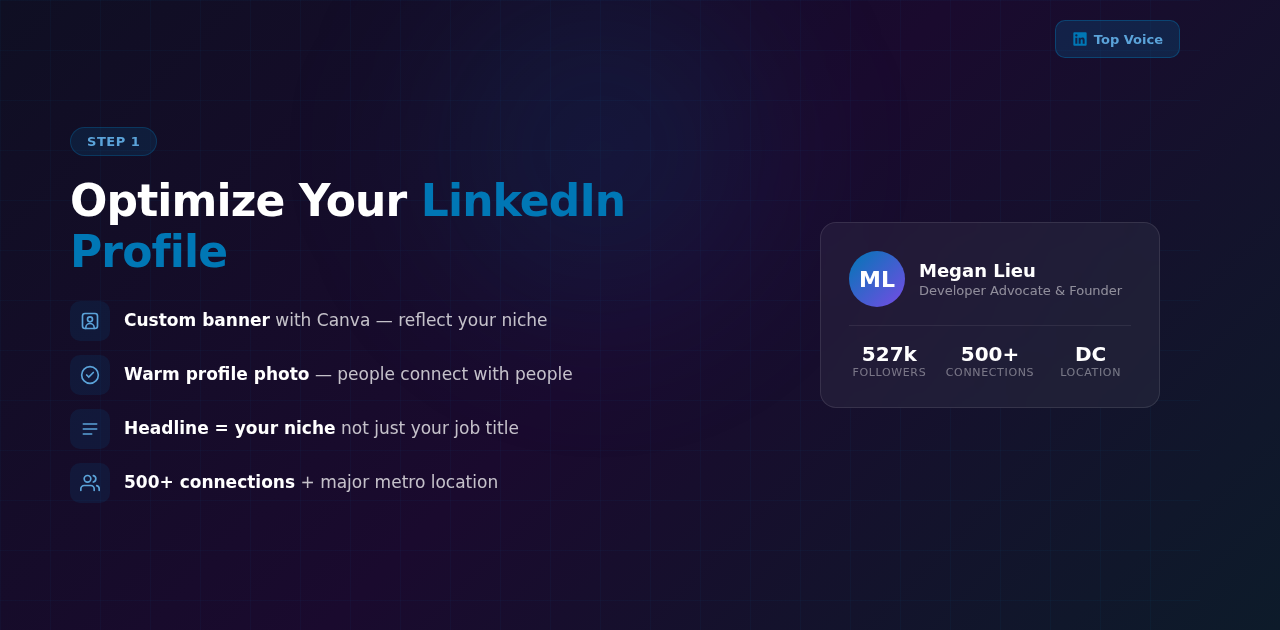
Megan Lieu, known as @meglovesdata on Instagram, is a Developer Advocate and Founder based in Washington D.C. She accidentally became a LinkedIn Top Voice and grew her following to over 200,000 followers. Her viral LinkedIn content strategy breaking down exactly how she would restart her LinkedIn from scratch resonated deeply, earning 1,200 likes, 257 comments, and over 20,000 saves. That level of save volume tells you something important: people want to reference this strategy repeatedly.
What makes Megan’s approach different from generic “post more” advice is that she addresses the full journey. Profile optimization, algorithm training, engagement tactics, and content strategy all work together as a system. Skip one piece and the whole thing slows down. In this guide, we will walk through each layer of her LinkedIn growth strategy so you can apply it whether you have 50 followers or 5,000.
But before you dive into tactics, you need to define your North Star goal. As @theromanknox (LinkedIn) outlines in his 7-step LinkedIn mastery framework, your North Star is the one outcome that drives every decision you make on the platform. It could be building a specific audience, establishing positioning in your niche, generating leads, creating authority, or driving revenue. Without this clarity, you will post randomly and wonder why nothing is working. Write your North Star goal down and let it guide every piece of content you create.
If you are just getting started with social media marketing in general, our guide on how to start digital marketing as a beginner in 2026 covers the foundational concepts you need before diving deep into any single platform.
Why Does LinkedIn Profile Optimization Matter So Much?
Your LinkedIn profile is not a digital resume. It is a landing page for your professional brand. Every visitor who lands on your profile makes a split-second decision about whether to follow you, connect with you, or move on. If your profile looks incomplete, generic, or inactive, you lose that visitor before you ever get a chance to show them your content.
Megan emphasizes that most people skip profile optimization and jump straight to posting. This is a mistake. You can write the best LinkedIn post in the world, but if someone clicks through to your profile and sees a blurry photo, no banner, and a headline that just says “Marketing Manager at Company X,” they have no reason to follow you. Your profile needs to tell a story about who you are, what you know, and why someone should pay attention to you.
How Do You Set Up a LinkedIn Profile That Attracts Followers?
Start with your visual presence. Upload a warm, professional profile photo where your face is clearly visible. Avoid overly formal corporate headshots with stiff expressions. People connect with people, not job titles. Next, create a customized banner using a tool like Canva. Your banner should reflect your niche, include a tagline or value proposition, and use colors that stand out against LinkedIn’s default blue and white interface.
Your headline is the single most important text on your profile. Instead of just listing your current job title, write a headline that states your target role or niche. For example, “Data Analytics Educator | Helping Teams Make Better Decisions With SQL and Python” tells visitors exactly what you do and who you help. This also helps LinkedIn’s algorithm understand what topics to associate with your content.
Fill out every section completely. List your company and education. Set your location to a major metro area, even if you work remotely, because this affects how LinkedIn categorizes and recommends your profile. Aim to get your connection count above 500. That number acts as a trust signal on the platform. People are more likely to connect with and follow someone who already has an established network.
How Do You Use the Featured Section and Skills?
Two profile sections that most creators underutilize are Featured and Skills. Your Featured section is prime real estate. Use the link option to showcase your best offer, lead magnet, or portfolio piece. The recommended image size for Featured links is 1200x627 pixels. This is where visitors look right after reading your headline, so treat it like a billboard for your expertise.
For Skills, list your top 2 instead of filling the section with dozens of generic ones. LinkedIn’s algorithm uses your Skills to categorize your profile and recommend you to the right people. Two focused, specific skills signal expertise. Twenty random skills signal confusion. If you are a content strategist, list “Content Strategy” and “Social Media Marketing,” not a laundry list of every tool you have ever touched.
For a deeper framework on building out your professional brand, check out our personal brand worksheet with 7 steps which walks you through defining your positioning before you touch your profile.
How Do You Train the LinkedIn Algorithm to Work in Your Favor?
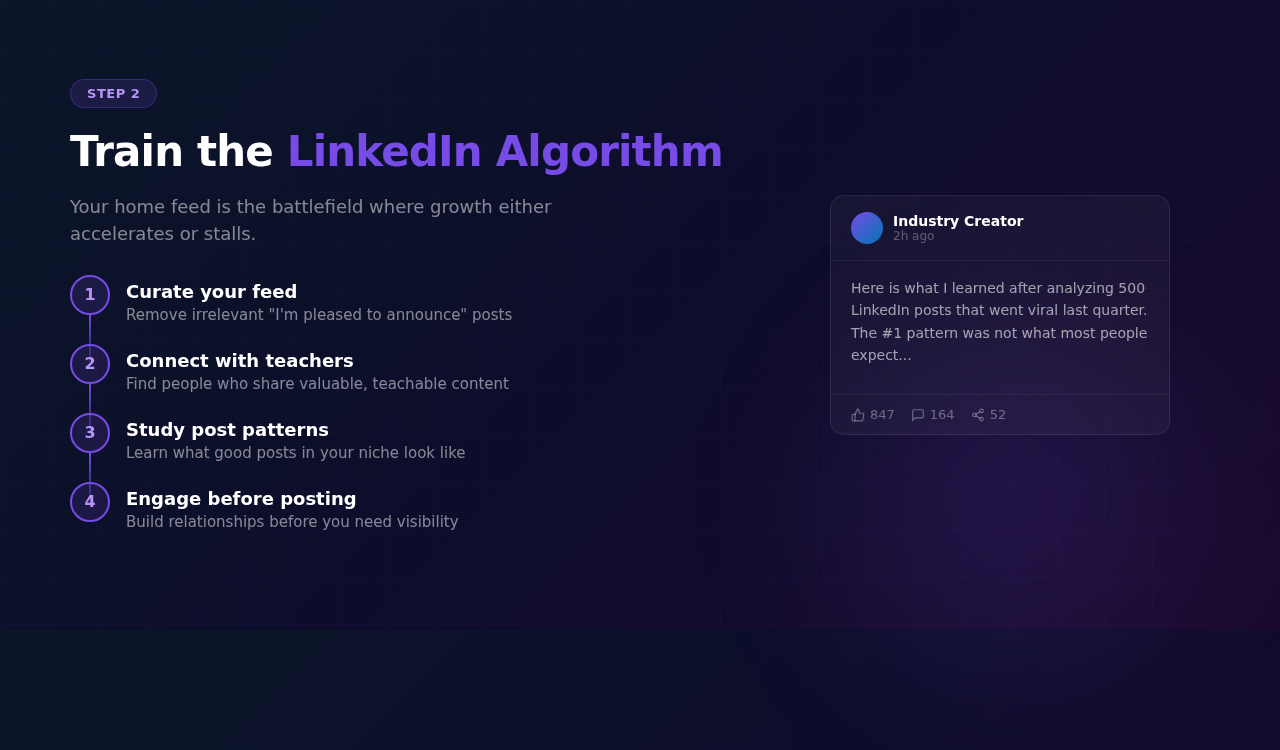
Most people treat LinkedIn’s home feed as a passive experience. You scroll, you see what the algorithm shows you, and you react. But the algorithm is learning from every single interaction you have on the platform. If you are not intentionally training it, it is showing you content that has nothing to do with your goals.
Megan’s strategy is to actively curate your feed by connecting with the right people. Specifically, connect with people in your target industry who share teachable, educational posts. This serves two purposes. First, it fills your feed with content relevant to your niche so you stay informed and inspired. Second, it shows you what good LinkedIn posts actually look like in terms of structure, tone, and formatting.
What Should Your LinkedIn Feed Look Like?
Think of your ideal LinkedIn feed as a curated learning environment. If you are in data analytics, you want to see posts from data professionals sharing SQL tips, career advice, project breakdowns, and industry trends. If you are in marketing, you want to see campaign case studies, strategy frameworks, and platform updates from other marketers.
To build this feed intentionally, search for hashtags and topics in your niche. Find 20 to 30 active creators who post valuable content regularly. Send them connection requests with a brief, personalized note. As you engage with their content over the following weeks, LinkedIn’s algorithm will start showing you more posts from similar creators. Within a month, your feed will look completely different from the default LinkedIn experience.
Do not limit yourself to only people in your exact industry. Also connect with creators who simply post well. Study their hooks, their formatting, their use of line breaks and emojis. Learning what a high-performing LinkedIn post looks like is just as important as knowing your industry. This is how you absorb the platform’s content style without having to guess.
According to research from Sprout Social, algorithmic feed curation is one of the most underutilized growth tactics across all social platforms. The creators who grow fastest are the ones who actively shape what the algorithm shows them, not the ones who passively consume. Buffer’s resources also highlight that intentional feed curation can double the speed at which you build relevant connections on professional networks.
What Changed on LinkedIn in 2026?
Understanding the current state of the platform is essential before you start building your strategy. @the_lucky_saini07 (LinkedIn) identified 7 major shifts in LinkedIn’s algorithm and user behavior in 2026 that directly affect how you should approach content creation.
Native video is rising fast. LinkedIn now has a dedicated “For You” space for video content. Product demos, face-to-camera clips, and even skits are gaining traction. If you have been thinking about adding video to your LinkedIn strategy, 2026 is the year to start.
Link-heavy posts get 441% higher reach. This is a massive shift from previous years when LinkedIn penalized posts with external links. The algorithm now prioritizes engagement quality over keeping users on-platform. This means you can actually drive traffic to your website, lead magnets, and offers without getting punished for it.
Long-form writing outperforms short posts. Posts in the 1,250 to 3,000 character range perform 228% better than short, AI-style posts. The algorithm rewards depth and substance. If you have been writing quick, punchy posts, consider going deeper.
Infographics are the top format. Infographics account for 29% of the top 1% of posts on LinkedIn, more than any other format. Visual content that teaches something in a scannable way gets saved and shared at higher rates.
Claude lead magnets are replacing GPT playbooks. Creators using Claude-generated lead magnets like detailed guides, templates, and frameworks are seeing 4,000 to 5,500+ comments on their posts. The quality difference is noticeable, and the audience is responding.
Posting 6 times per week gets 3.1x more views. Compared to posting 2 to 3 times per week, the 6x/week cadence dramatically increases per-post views. The algorithm rewards consistent, high-frequency creators.
Niche content beats broad content. After the March 2026 algorithm update, LinkedIn explicitly rewards niche-specific content over generic, broad-appeal posts. Double down on your specific expertise instead of trying to appeal to everyone.
These trends should shape how you plan your content going forward. Tools like Social by InstantDM can help you track these patterns and adapt your scheduling to match what the algorithm currently rewards.
What Is the Best Way to Engage on LinkedIn Before You Start Posting?
Here is where most LinkedIn growth advice fails. It tells you to start posting immediately. Megan takes the opposite approach. Before you write a single post, spend time engaging in other people’s comment sections. This is not just about being polite or building relationships, though both matter. It is a strategic move that sets up everything else you will do on the platform.
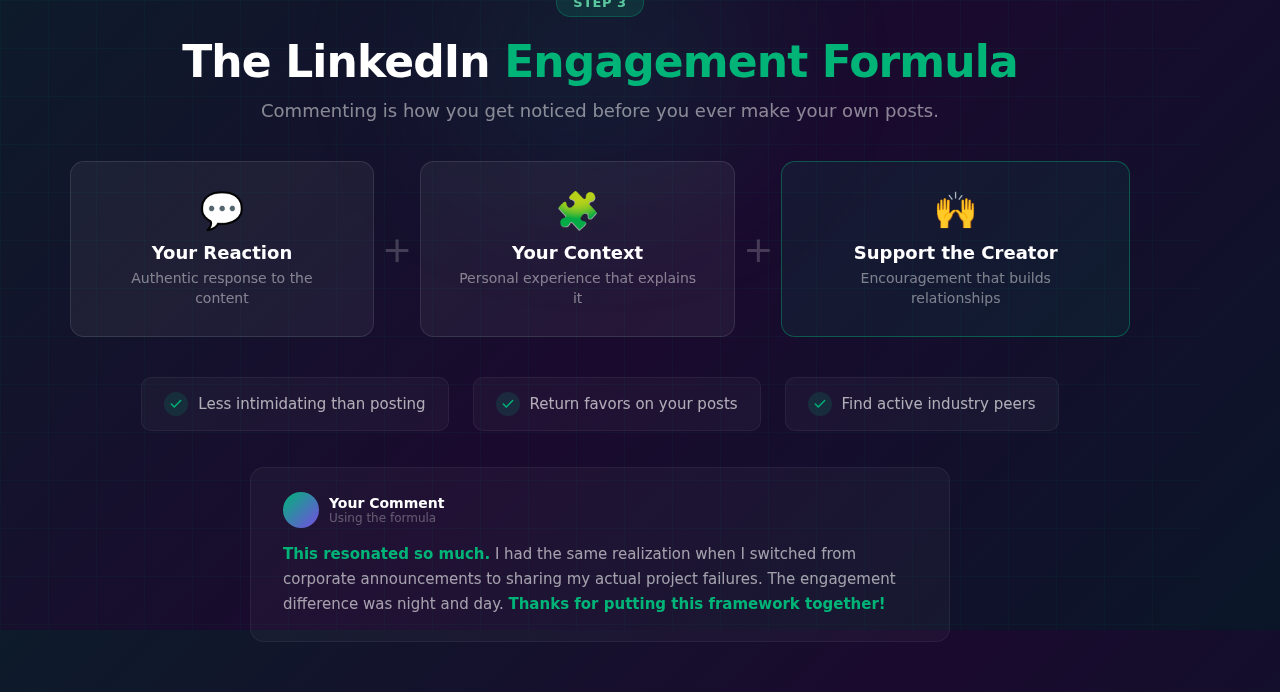
Commenting is less intimidating than posting. When you leave a comment, the pressure is lower. You are responding to someone else’s ideas rather than putting your own out there for the first time. This makes it the perfect on-ramp for new LinkedIn users who feel anxious about creating content. But the benefits go far beyond comfort.
How Do You Write LinkedIn Comments That Drive Growth?
Megan shares a specific commenting formula that works consistently. Start with your genuine reaction to the post. Then add personal context, something from your own experience that relates to the topic. Finally, include encouraging support for the creator. This three-part structure turns a simple comment into a mini piece of content in its own right.
For example, if someone posts about a lesson they learned from a failed project, your comment might look like this: “This really resonated with me. I had a similar experience last year when a campaign I spent three months on completely flopped. It taught me to validate ideas with small tests before going all in. Thank you for sharing this so openly.”
Why does this formula work? First, it adds value to the conversation. Other people reading the comments learn something from your perspective. Second, it signals to the original creator that you are an engaged, thoughtful person. Many creators will check out your profile and engage with your content in return. This creates a reciprocal dynamic that accelerates your visibility on the platform.
Third, and this is the strategic part, it helps you find other active people in your industry. When you comment regularly on posts from creators in your niche, you start to notice the same names appearing in comment sections. These are your future collaborators, supporters, and amplifiers. Building relationships with them through comments is the foundation of organic LinkedIn growth.
How Do You Build a Strategic Engagement Network?
@theromanknox (LinkedIn) takes engagement a step further with a structured approach. Identify 10 to 20 key people in your niche who are actively posting and growing. These should be people at your level or slightly above, not mega-influencers who will never notice your comments. Send them connection requests with a personalized note referencing something specific from their content.
Once connected, engage with their posts daily. Leave thoughtful comments that add to the conversation. Do not just say “Great post!” and move on. After a week or two of consistent engagement, send a personalized DM. Reference a specific post they wrote, share what you learned from it, and offer something of value without asking for anything in return.
Also reply to every comment on your own posts. This signals to the algorithm that your post is generating active conversation, which increases its distribution. It also builds relationships with the people who took the time to engage with your content. These are your most valuable connections.
HubSpot’s research on social media engagement consistently shows that commenting is one of the highest-leverage activities for building a following on any platform. LinkedIn is no exception.
How Do You Create LinkedIn Posts That Actually Resonate?
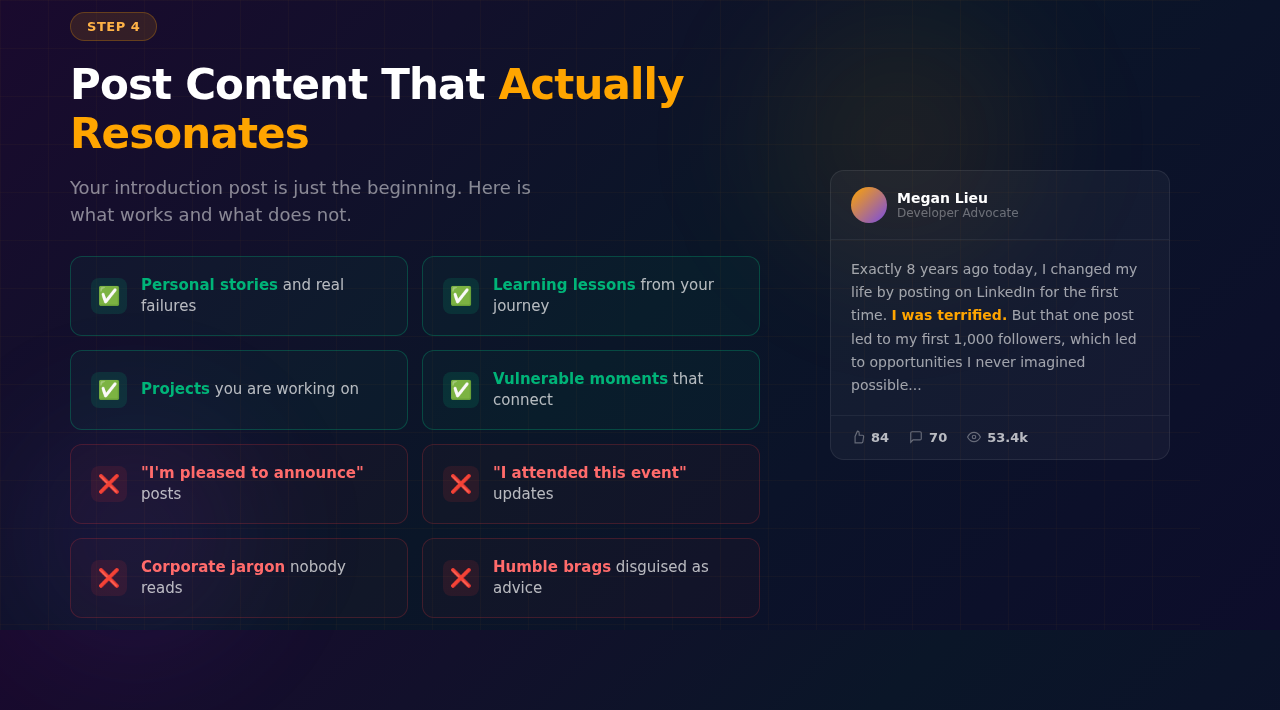
Once you have optimized your profile, trained your algorithm, and spent time engaging in comments, you are ready to post. But what should your first post be? Megan’s advice is simple and effective: start with an introduction post that includes a picture of yourself. Using a content planning tool like Social by InstantDM to map out your first few weeks of posts can take the guesswork out of getting started.
An introduction post does three things at once. It tells people who you are, it establishes what you will be posting about, and it puts a face to your name. Include a photo of yourself because LinkedIn posts with images consistently get more engagement than text-only posts, and a personal photo builds trust faster than any stock image or graphic.
What Types of Content Perform Best on LinkedIn?
After your introduction, the content that resonates most on LinkedIn shares one quality: authenticity. Megan specifically calls out personal stories, learning lessons, project breakdowns, and vulnerable moments as the types of posts that outperform everything else. This stands in stark contrast to the “I’m pleased to announce” posts that fill so many LinkedIn feeds.
Think about why this works. LinkedIn users scroll through hundreds of posts that sound the same. Corporate updates, job announcements, and generic motivational quotes blend together. But when someone shares a real story about a mistake they made, a challenge they overcame, or a lesson they learned the hard way, it cuts through the noise. People stop scrolling because they see themselves in that story.
Vulnerability is not about oversharing or being unprofessional. It is about being human in a space that often rewards polish over authenticity. Share the project that did not go as planned. Talk about the skill you struggled to learn. Describe the moment you almost gave up on a career goal. These stories build deeper connections than any perfectly crafted thought leadership post. If you want to see this principle in action, browse LinkedIn Pulse to find trending posts in your industry and notice which ones get the most engagement.
For a structured approach to turning your experiences into compelling content, our guide on the storytelling system with 7 parts provides a framework you can use to craft posts that connect emotionally while still delivering value.
What LinkedIn Hook Formulas Actually Stop the Scroll?
The first two lines of your LinkedIn post determine whether someone keeps reading or scrolls past. @tanisha_valmiki_19 (LinkedIn) broke down 10 proven hook formulas that consistently stop the scroll. These are not vague suggestions. They are specific patterns you can plug your content into today.
1. The Contrast Pattern. “Stop doing X. Start doing Y.” This works because it creates immediate tension between an old habit and a new one. Example: “Stop cold-pitching on LinkedIn. Start building relationships first.”
2. The Time Constraint. “In 60 seconds, you’ll learn _____.” People love efficiency. Promising a quick win in a specific timeframe makes the post feel low-commitment and high-value.
3. The Curiosity Gap. “The one thing nobody explains is _____.” This hook implies that the reader is missing critical information, which makes them need to keep reading to fill that gap.
4. The Old Advice vs New Truth. “X won’t help you. Y will.” This challenges conventional wisdom and positions you as someone with insider knowledge. Example: “Posting every day won’t grow your LinkedIn. Engaging in comments will.”
5. The Strong Opinion. “Most LinkedIn advice is wrong.” Taking a bold stance immediately separates you from the sea of agreeable content. People either strongly agree or strongly disagree, and both reactions drive engagement.
6. The Stat Pattern. “90% focus on X. The smart ones do Y.” Numbers create instant credibility and specificity. The contrast between the majority and the minority makes readers want to be in the smarter group.
7. The Pain Recognition. “You’re trying, but not growing.” This hook names the exact frustration your target audience feels. When someone sees their own struggle reflected back at them, they stop scrolling.
8. The Results Proof. “How I got ___ in ___ days.” Specific results in a specific timeframe is one of the most powerful hooks because it promises a replicable outcome. Example: “How I got 5,000 LinkedIn followers in 30 days.”
Practical advice: Pick ONE hook style and use it consistently for 7 days. Track your reach and impressions. After a week, compare results and either double down or test a different style. This eliminates guesswork and gives you data on what resonates with your specific audience.
Hooks to avoid: “Happy to share…” and “Excited to announce…” These are LinkedIn cliches that signal generic, self-promotional content. The algorithm and the audience have both learned to scroll past them.
How Do You Structure a LinkedIn Post That Converts?
Beyond the hook, the body of your post needs a clear structure. @theromanknox (LinkedIn) recommends a writing framework that works for any topic: Hook, Problem, Agitate, Solution, Value, Power Closer.
Start with your hook (the formulas above). Then state the Problem your audience faces. Agitate that problem by explaining why it matters and what happens if they ignore it. Present your Solution. Deliver Value by explaining how to implement the solution. End with a Power Closer that reinforces the main takeaway and leaves a lasting impression.
This structure works because it mirrors how people actually process information. They need to feel the pain of the problem before they care about the solution. And they need to see clear value before they save, share, or follow.
How Often Should You Post on LinkedIn?
Consistency matters more than frequency. Posting three to five times per week is a strong cadence for most creators. If you can only manage two posts per week, that is fine as long as you stick with it. The algorithm rewards regular activity, and your followers come to expect your content on a predictable schedule.
If you want a more structured approach, @sahelichatterjeehere (LinkedIn) recommends a 5x/week themed schedule: Monday for authenticity posts, Wednesday for growth-focused content, Friday for informational or educational posts, Saturday for personal stories, and Sunday for growth strategies. This themed approach removes the daily decision fatigue of “what should I post today?” and ensures variety in your content mix.
If scheduling posts ahead of time feels like a challenge, tools like Social by InstantDM can help you batch-create content and schedule your LinkedIn posts so you never miss a publishing day. Planning your content calendar in advance removes the daily pressure of deciding what to post.
How Do You Build a Sustainable LinkedIn Content System?
Growing to 200,000 followers does not happen from a handful of viral posts. It happens from showing up consistently over months and years. The creators who sustain long-term growth on LinkedIn are the ones who build systems around their content creation, not the ones who rely on bursts of inspiration.
Start by documenting your experiences as they happen. Keep a running note on your phone where you jot down lessons learned, interesting conversations, project updates, and observations from your work. When it is time to create content, you have a bank of raw material to draw from instead of staring at a blank page.
How Do You Capture Content From Your Daily Life?
@sahelichatterjeehere (LinkedIn) built a content system based on one principle: capture your days. Document everything. Books you are reading, conversations that surprised you, family moments that taught you something, professional wins and failures. Her content, which accumulated over 10 million views, was built entirely from personal stories.
LinkedIn’s algorithm loves personal stories because they drive engagement. When you share something real from your life, people relate to it, comment on it, and share it. The key is building a habit of noticing the stories happening around you every day and recording them before you forget.
Keep a dedicated note on your phone or in a tool like Notion. Every time something interesting happens, jot down two to three sentences. Over the course of a week, you will have more content ideas than you can possibly use. This eliminates the biggest content creation blocker: “I don’t know what to post.”
How Do You Use Books as a Content Engine?
One of the most efficient content systems comes from @sahelichatterjeehere (LinkedIn)‘s book strategy. Make a list of 30 business books relevant to your niche. Each week, pick one book and share your top 3 learnings from it as a LinkedIn post. Tag the author in the post.
This strategy works on multiple levels. First, it gives you a guaranteed content source every single week for 30 weeks. Second, tagging the author exposes your post to their audience. Many authors will engage with posts that reference their work, which puts you in front of their followers. Third, it positions you as someone who reads, learns, and shares knowledge, which builds authority in your niche.
How Do You Batch Create LinkedIn Content?
Set aside one to two hours per week specifically for content creation. Use that time to turn your raw notes into polished posts. Write three to five posts in a single sitting, then schedule them throughout the week. This batching approach is far more efficient than trying to create one post from scratch every day.
Our guide on becoming a content machine in just one hour breaks down a repeatable system for producing multiple pieces of content in a focused session. The key is separating the creative work of writing from the daily habit of publishing.
How Do You Build a LinkedIn Content Funnel?
Random posting leads to random results. @theromanknox (LinkedIn) recommends building a deliberate content funnel with three stages, each designed to move your audience closer to taking action.
Stage 1: Awareness. These are posts designed for maximum reach, impressions, and engagement. Think introduction posts, bold opinions, industry observations, and trending topic takes. The goal is to get your name and face in front of as many new people as possible.
Stage 2: Consideration. These are high-value posts designed for saves, trust-building, and follower growth. Think detailed how-to guides, frameworks, case studies, and lessons learned. The goal is to prove your expertise so people decide you are worth following long-term.
Stage 3: Conversion. These are strategic posts designed for link clicks, off-platform moves, and measurable results. Think lead magnet promotions, service explanations, client testimonials, and calls to action that drive traffic to your website or booking page. The goal is to turn followers into clients or customers.
Most creators only post in Stage 1 and wonder why they have followers but no revenue. Others only post in Stage 3 and wonder why nobody sees their offers. The funnel only works when all three stages are active. A healthy content mix is roughly 40% Awareness, 40% Consideration, and 20% Conversion.
How Do You Repurpose Content Across Platforms?
Your LinkedIn content does not have to live only on LinkedIn. A strong LinkedIn post can become an Instagram carousel, a Twitter thread, or a short-form video script. Megan herself demonstrates this by sharing LinkedIn growth advice as Instagram carousels that go viral. The core ideas transfer across formats; only the packaging changes.
If you are managing content for clients or running a social media business, having a solid social media management contract in place protects you and sets clear expectations. And if you need ideas for high-ticket client content, our list of SMM post ideas for high-ticket clients gives you templates that work across industries.
How Do You Turn LinkedIn Connections Into Clients?
Growing a following is not the end goal. For most professionals, LinkedIn exists to generate opportunities, whether that means clients, partnerships, job offers, or speaking invitations. @sahelichatterjeehere (LinkedIn) developed a client acquisition system that works alongside your content strategy.
How Do You Pitch Dream Clients on LinkedIn?
Each week, identify 2 dream clients. These are people or companies you genuinely want to work with. Before you reach out, spend time understanding their specific pain points. Look at their recent posts, company updates, and public challenges. Then craft a customized pitch that includes four elements: their pain points, your services, the solution you would provide, and the specific benefits they would receive.
This is not a copy-paste template. Each pitch should feel like it was written specifically for that person, because it was. Generic pitches get ignored. Personalized pitches that demonstrate you understand someone’s business get responses. Even if only 1 out of 5 pitches converts, that is 2 new clients per month from a very targeted approach.
How Do You Use Lead Magnets to Attract Inbound Clients?
Outbound pitching works, but inbound attraction scales better. Create free resources that demonstrate your expertise: freebies, ebooks, cheatsheets, templates, or mini-courses. Share these as LinkedIn posts with a link to download. In 2026, LinkedIn’s algorithm actually rewards link-heavy posts with 441% higher reach, so do not be afraid to include your download link directly in the post.
The most effective lead magnets solve one specific problem quickly. A “LinkedIn Headline Cheat Sheet” performs better than a “Complete Guide to Social Media Marketing” because it promises an immediate, specific win. Use a tool like Social by InstantDM to track which lead magnet posts drive the most clicks and double down on those formats.
@the_lucky_saini07 (LinkedIn) notes that creators using Claude to build detailed lead magnets are seeing 4,000 to 5,500+ comments on their posts. The quality of your free resource matters. A well-crafted lead magnet positions you as an expert and makes the pitch conversation feel natural because the prospect already trusts your knowledge.
What Common LinkedIn Growth Mistakes Should You Avoid?
Understanding what not to do is just as important as knowing the right strategy. Megan acknowledges that she made plenty of mistakes on her journey to becoming a LinkedIn Top Voice. Learning from those mistakes can save you months of wasted effort.
The biggest mistake is treating LinkedIn like a broadcast channel. If your only activity on the platform is posting your own content and never engaging with anyone else’s, the algorithm will not favor you. LinkedIn rewards participation in the community, not just content creation. Spend at least as much time commenting and engaging as you do creating posts.
Another common mistake is chasing virality over value. A post that gets 10,000 impressions but provides no real insight will not convert those viewers into followers. A post that gets 500 impressions but delivers genuine value will attract followers who stick around long-term. Focus on building an audience that cares about what you say, not just a number that looks impressive.
The third mistake is inconsistency. Posting every day for two weeks and then disappearing for a month confuses both the algorithm and your audience. LinkedIn’s distribution system favors accounts that maintain a regular posting schedule. If you need to take a break, that is completely fine, but plan for it and come back with a clear restart strategy.
A fourth mistake that has become more relevant in 2026 is ignoring niche specificity. After the March 2026 algorithm update, LinkedIn explicitly rewards niche content over broad, general-audience posts. If you are trying to be everything to everyone, the algorithm will not know who to show your content to. Pick a lane and stay in it.
A fifth mistake is using weak hooks. Opening your post with “Happy to share…” or “Excited to announce…” signals to both the algorithm and the reader that the post is generic self-promotion. Use one of the proven hook formulas from @tanisha_valmiki_19 (LinkedIn) outlined earlier in this guide and test different styles until you find what works for your audience.
Ready to Start Your LinkedIn Growth Journey?
Growing a LinkedIn following from scratch to 200,000 followers is not about hacks or shortcuts. It is about building a strong profile, curating your environment, engaging with intention, and sharing authentic content consistently over time. Megan Lieu’s strategy proves that you do not need to be famous or have a massive existing audience to build something significant on LinkedIn.
Here is your action plan to start today:
- Week 1: Optimize your profile completely. Photo, banner, headline, Featured section, Skills. Define your North Star goal.
- Week 2: Curate your feed. Connect with 20 to 30 active creators in your niche. Start commenting daily using the reaction-context-support formula.
- Week 3: Publish your first posts. Start with an introduction post. Use the themed schedule to plan your content. Test one hook style for the full week.
- Week 4 and beyond: Build your content system. Start documenting daily life. Create your book list. Build your first lead magnet. Pitch your first 2 dream clients.
If you are ready to take your LinkedIn strategy seriously and want tools to help you plan, schedule, and optimize your content, Social by InstantDM gives you everything you need to execute this growth strategy without burning out. Start with profile optimization, commit to daily engagement, and watch your following grow.
This guide draws on insights from Megan Lieu (@meglovesdata), @sahelichatterjeehere (LinkedIn), @tanisha_valmiki_19 (LinkedIn), @theromanknox (LinkedIn), and @the_lucky_saini07 (LinkedIn). Their combined expertise in LinkedIn growth, content strategy, and platform trends informed the comprehensive framework presented here.
Frequently asked questions
How long does it take to grow on LinkedIn?
Most creators see meaningful traction within 3 to 6 months of consistent posting and engagement. However, building a large following of 100k+ typically takes 1 to 2 years of dedicated effort. The key variable is consistency, not speed. Creators who post 3 to 5 times per week and engage daily in comments tend to grow fastest.
What type of content performs best on LinkedIn?
Personal stories, vulnerability-driven posts, and actionable how-to content consistently outperform corporate announcements. Posts that share real lessons from failures, behind-the-scenes project details, or step-by-step frameworks tend to get the highest engagement. Carousel posts and text posts with a strong hook in the first two lines also perform well.
How do I optimize my LinkedIn profile for growth?
Start with a professional, warm profile photo and a customized banner created in Canva that reflects your niche. Write a headline that states your target role or expertise, not just your current job title. List your company and education, aim for 500+ connections, and set your location to a major metro area. Think of your profile as a landing page for your professional brand.
What LinkedIn hook formulas get the most engagement?
The most effective hooks follow proven psychological patterns. Contrast hooks like 'Stop doing X. Start doing Y.' create immediate tension. Curiosity gaps like 'The one thing nobody explains is _____.' make readers need to keep going. Results proof hooks like 'How I got 10k followers in 30 days.' leverage social proof. Pick one hook style and test it for a full week before switching.
How often should I post on LinkedIn in 2026?
Recent data shows that posting 6 times per week gets 3.1x more views per post compared to posting 2 to 3 times per week. However, consistency matters more than raw frequency. A 5x/week schedule with themed days (authenticity Monday, growth Wednesday, info Friday, personal stories Saturday, growth Sunday) gives you structure while maintaining variety.
Can LinkedIn actually generate clients and revenue?
Yes. The most effective approach is to pitch 2 dream clients per week with fully customized pitches that address their specific pain points, outline your services, and explain the direct benefits they will receive. Combine this with free lead magnets like ebooks, cheatsheets, or templates shared as posts to attract inbound interest. LinkedIn's algorithm in 2026 actually prioritizes link-heavy posts, making it easier to drive traffic to your offers.